Electronics 6 models
HP All-in-One Wireless Printers with Fax & Scan: Reliability Breakdown
As Amazon Associates, we earn from qualifying purchases. This means we may receive a small commission at no extra cost to you if you click through and make a purchase.
When selecting hp printers all in one wireless fax, scan, print hardware, the primary operational concern is long-term mechanical dependability under steady office workloads. Many multifunction units claim to do everything from standalone fax transmission to double-sided scanning, but real-world reliability hinges on how the paper feed rollers, automatic document feeders, and internal printheads handle continuous document batches. Buyers seeking a dependable HP wireless multifunction printer with fax capabilities must carefully assess how scanning mechanisms, dual-band Wi-Fi recovery systems, and onboard security protections protect daily office operations from costly downtime, paper jams, and connectivity drops.
This HP all-in-one printer comparison covers exactly six distinct models manufactured by HP to clarify which hardware tier aligns with your document volume and scanning needs. These units diverge significantly across internal transport architecture: some employ single-pass duplex document feeders that scan both sides of a page simultaneously, others use reversing dual-pass auto document feeders, and compact tiers rely on simplex one-sided feeders. They also span standard desktop letter formats, wide-format tabloid media handling, traditional cartridge configurations, and high-capacity refillable ink tanks. Evaluating these architectural differences ensures you choose a machine that maintains reliable throughput without premature mechanical fatigue.
Which HP All-in-One Printers Should You Buy
- HP OfficeJet Pro 9125 Wireless All-in-One: Best for mid-sized office teams requiring automated double-sided scanning, robust dual-band Wi-Fi stability, and commercial Wolf Pro security.
- HP OfficeJet Pro 9135 Wireless All-in-One: Best for high-volume workgroups demanding single-pass two-sided scanning, dual 250-sheet paper cassettes, and walk-up USB document transfers.
- HP OfficeJet Pro 8135 Wireless All-in-One: Best for quiet home offices needing water-resistant color prints, basic automated sheet feeding, and standalone analog faxing.
- HP OfficeJet Pro 9730 Wide-Format Wireless: Best for design studios and contractors who must scan legal files and output 11×17 tabloid drawings with wide P3 color accuracy.
- HP Smart Tank Plus 651 Wireless: Best for home document stations prioritizing high page volume right from the box without recurrent ink cartridge maintenance.
- HP OfficeJet Pro 8135e Wireless All-in-One: Best for remote professionals seeking automated document management backed by extended two-year warranty coverage through HP+ enrollment.
HP OfficeJet Pro 9125 Wireless All-in-One
Best for: Remote professionals seeking extended two-year warranty protection
Pros
- Optional 2-year warranty via HP+
- Automatic two-sided printing
- AI-enabled print formatting
Cons
- One-sided simplex ADF scanner
- Mandatory cloud connection for HP+

HP OfficeJet Pro 9730 Wide-Format Wireless
9.0/10 Our score
- Color
- Off White
- Size
- 22.9 x 18.4 x 15.20
- Dimensions
- 22.9 x 15.2 x 18.4 inches
Best for: Offices printing 11×17 tabloid floorplans and spreadsheets
Pros
- Wide-format 11×17 printing
- P3 wide color gamut coverage
- Single-pass 2-sided ADF
- Dual 250-sheet paper trays
Cons
- Substantial 43-pound weight
- Requires large dedicated workspace

HP OfficeJet Pro 8135 Wireless All-in-One
8.6/10 Our score
- Color
- Light Cement
- Size
- one size
- Dimensions
- 13.29 x 18.12 x 9.17 inches
Best for: Home offices needing quiet operation and faxing
Pros
- Dedicated Quiet Mode operation
- Water and smear-resistant inks
- Automatic two-sided printing
Cons
- Simplex one-sided ADF only
- Modest 10 ppm color print speed

HP OfficeJet Pro 9135 Wireless All-in-One
8.4/10 Our score
- Color
- Cement
- Size
- one size
- Dimensions
- 15.6 x 17.2 x 12.53 Inches
Best for: High-volume workgroups demanding fast single-pass duplex scanning
Pros
- Single-pass two-sided ADF
- 500-sheet dual tray capacity
- Large 4.3-inch color touchscreen
- Front walk-up USB port
Cons
- Heavier 26.1-pound chassis footprint
- Larger desktop space requirement

HP OfficeJet Pro 9125 Wireless All-in-One
7.8/10 Our score
- Printer Type
- HP Thermal Inkjet
- Printer Output Type
- Color
- Item Weight
- 20.5 pounds
Best for: Offices needing dual-pass duplex scanning and faxing
Pros
- Dual-pass duplex ADF scanning
- HP Wolf Pro Security suite
- Fast 22 ppm black print speed
Cons
- Single 250-sheet paper tray
- Reversing ADF slower than single-pass
The HP OfficeJet Pro 9125 Wireless All-in-One is engineered as a core document hub for standard commercial workspaces. Built with an internal HP Thermal Inkjet engine, it delivers print speeds reaching up to 22 pages per minute in black and 18 pages per minute in color, with a maximum monochrome copy rate of 21 pages per minute. The paper transport system relies on a single 250-sheet input tray, which provides adequate capacity for light-to-medium workgroups while keeping the chassis footprint at 13.48 inches deep, 17.3 inches wide, and 10.94 inches high. Document management is anchored by an automatic document feeder paired with an easy slide-off flatbed glass surface, designed to prevent page corner snags when lifting sensitive originals.
From an operational standpoint, this model features a dual-pass two-sided automatic document feeder. In practice, a reversing dual-pass mechanism draws the sheet through, scans side one, mechanically reverses the paper direction, and pulls it back through to capture side two. While this mechanical inversion cycle takes longer and exercises the internal pick rollers more than a single-pass scanner, it provides automated two-sided scanning and copying without user intervention. The hardware features a 2.7-inch color touchscreen with a phone-like graphical interface, dual-band Wi-Fi that automatically detects and resolves connection disruptions, and HP Wolf Pro Security to safeguard network integrity against unauthorized digital infiltration.
This model is best suited for administrative desks that handle mixed multi-page contracts, incoming faxes, and professional presentation decks. For buyers considering hp printers all in one wireless hp officejet pro printers, the 9125 represents a dependable baseline that balances duplex digital workflows with a one-year limited hardware warranty. However, offices that process hundreds of double-sided originals daily may find the mechanical wear of the reversing ADF limiting, making the stepped-up single-pass scanning hardware in higher tiers worth considering.
- Dual-pass automatic document feeder supporting two-sided scanning and copying
- Rated print speeds up to 22 ppm black and 18 ppm color with up to 99 multi-copy runs
- Enterprise-grade HP Wolf Pro Security protecting corporate network endpoints
- Self-healing dual-band Wi-Fi and 2.7-inch color navigation touchscreen
HP OfficeJet Pro 9135 Wireless All-in-One
HP OfficeJet Pro 9135 Wireless All-in-One
8.4/10 Our score
- Color
- Cement
- Size
- one size
- Dimensions
- 15.6 x 17.2 x 12.53 Inches
The HP OfficeJet Pro 9135 Wireless All-in-One builds upon the 9000-series platform to address the mechanical demands of higher-volume workgroups. Its internal print engine is accelerated to achieve up to 25 pages per minute in black and 20 pages per minute in color, alongside an upgraded 23 pages per minute black copy speed. Physical paper handling is doubled compared to the entry 9125, incorporating two 250-sheet input cassettes for a total 500-sheet paper capacity. This dual-tray configuration allows offices to keep letter paper in one cassette and legal sheets or company letterhead in the other, eliminating manual tray reconfigurations and reducing feed alignment errors.
The standout mechanical distinction on the 9135 is its single-pass two-sided automatic document feeder. Rather than mechanically flipping paper across internal rollers, this system uses dual scanning sensor arrays to read both sides of a page simultaneously as it passes over the scan bar. This drastically reduces the potential for paper jams, eliminates the physical stress of reversing document paths, and noticeably accelerates batch digitizing and faxing. The user interface is upgraded to an expansive 4.3-inch color touchscreen, and the unit adds an integrated front-facing USB flash drive port for direct walk-up printing and document scanning without requiring a network-connected host computer.
Weighing 26.1 pounds and measuring 15.6 inches deep by 17.2 inches wide, this unit has a more substantial desktop footprint than entry-level models. It incorporates HP Wolf Pro Security, dual-band self-healing Wi-Fi, and an easy slide-off flatbed glass assembly. For offices processing substantial incoming and outgoing fax documents alongside daily duplex contracts, the single-pass scanner and 500-sheet capacity make the 9135 a considerably more durable choice than single-tray or reversing-feed multifunction printers.
- Single-pass two-sided automatic document feeder for faster, low-wear duplex scanning
- Dual 250-sheet input trays delivering 500 sheets of total paper capacity
- Generous 4.3-inch color touchscreen and front-panel USB flash drive walk-up port
- Rapid output speeds up to 25 ppm black and 20 ppm color
HP OfficeJet Pro 8135 Wireless All-in-One
HP OfficeJet Pro 8135 Wireless All-in-One
8.6/10 Our score
- Color
- Light Cement
- Size
- one size
- Dimensions
- 13.29 x 18.12 x 9.17 inches
The HP OfficeJet Pro 8135 Wireless All-in-One is specifically tailored for dedicated home workspaces and satellite office environments. It outputs documents at up to 20 pages per minute for black text and 10 pages per minute for color graphics, with a maximum monochrome copy speed of 12 pages per minute. The main paper cassette accommodates 225 sheets, and the chassis is constructed using more than 45% recycled plastic content. Measuring 13.29 inches deep by 18.12 inches wide and weighing an approachable 17.6 pounds, it fits cleanly on home credenzas and smaller workspace tables without dominating usable room.
Mechanical paper feeding differs markedly from the 9000-series commercial units. The 8135 features an automatic document feeder paired with a standard flatbed scanner, but the ADF is strictly a one-sided simplex scanner. While the printer executes automatic two-sided printing across its paper path, scanning multi-page double-sided contracts requires manually re-feeding the stack to capture reverse pages. For quiet home environments, HP incorporates a dedicated Quiet Mode setting that dampens print carriage acoustic spikes, allowing late-night output without disruptive mechanical chatter. Document security is maintained via the HP Wolf Essential Security suite.
This model is ideal for freelance professionals, solo practitioners, and remote employees who produce professional-quality reports, invoices, and smear-resistant color flyers. Its ink formulation produces water-, smear-, and fade-resistant documents that withstand highlighter use. However, buyers should recognize that if regular double-sided document digitizing or multi-page duplex faxing is central to daily operations, the manual page re-feeding mandated by this simplex ADF will introduce extra labor and potential page-order handling mistakes.
- Dedicated Quiet Mode for reduced mechanical acoustic noise in residential workspaces
- Automatic two-sided printing backed by a 225-sheet primary paper tray
- Water-, smear-, and fade-resistant pigment-based color document output
- Responsive 2.7-inch color touchscreen interface with HP Wolf Essential Security
HP OfficeJet Pro 9730 Wide-Format Wireless
HP OfficeJet Pro 9730 Wide-Format Wireless
9.0/10 Our score
- Color
- Off White
- Size
- 22.9 x 18.4 x 15.20
- Dimensions
- 22.9 x 15.2 x 18.4 inches
The HP OfficeJet Pro 9730 Wide-Format Wireless stands apart from conventional office multifunctions by providing wide-format media processing up to 11×17 inches (tabloid size). Operating at print speeds reaching 22 pages per minute black and 18 pages per minute color, this heavyweight 43-pound machine is constructed for demanding technical and creative tasks. It features two 250-sheet input cassettes for a combined 500-sheet paper supply, allowing offices to concurrently stock regular 8.5×11 letter stock in one tray and large 11×17 tabloid media in the second, preventing constant paper swaps.
The scanning and optical hardware on the 9730 is similarly scaled up. It features an oversized flatbed scanner capable of reading legal-sized documents directly on the platen, alongside an automatic document feeder that handles paper sizes up to 11×17 inches with single-pass two-sided scanning. This architecture reads both sides of large ledger sheets in a single movement, preserving document integrity on wide architectural floorplans, financial spreadsheets, and mood boards. It is also engineered to support the P3 wide color gamut, reproducing broader, screen-accurate color palettes than traditional sRGB office inkjets.
Given its substantial physical profile—measuring 22.9 inches deep, 15.2 inches wide, and 18.4 inches high—this machine requires dedicated, heavy-duty office furniture. Navigation is executed through a vibrant 4.3-inch color touchscreen, complemented by dual-band Wi-Fi connection monitoring and app-based management. This model is optimal for engineering, architecture, and marketing operations where 11×17 printing, legal flatbed digitizing, and standalone fax functionality must reside inside a single hardware unit.
- Wide-format print output and auto-duplex ADF scanning up to 11×17 inches
- P3 color space support delivering wider gamut fidelity than conventional sRGB
- Dual 250-sheet trays for 500 sheets total dual-media capacity
- Legal-size flatbed scanner and high-speed single-pass two-sided document feeding
HP Smart Tank Plus 651 Wireless

HP Smart Tank Plus 651 Wireless
8.2/10 Our score
- Color
- White with Black Top
- Size
- Medium
- Dimensions
- 17.7 x 14.7 x 7.8 inches
Best for: Home setups prioritizing cartridge-free bulk page yields
Pros
- Up to 2 years ink included
- Mess-free bottle refill system
- Lightweight 10.3-pound profile
Cons
- 10 ppm maximum copy speed
- Simplex document feeder
The HP Smart Tank Plus 651 Wireless approaches document management from a refillable tank architecture rather than standard disposable cartridges. Supplied with up to two years of Original HP Ink in the box—rated for up to 8,000 color pages or 6,000 black pages—this model focuses squarely on high-volume document generation with minimal consumable intervention. The ink replenishment system uses specialized keyed bottles that insert directly into reservoir ports and drain automatically without squeezing, substantially lowering the risk of accidental workspace ink spills.
From a hardware and transport perspective, the Smart Tank Plus 651 is noticeably lighter and more modest than the OfficeJet Pro commercial lines, weighing just 10.3 pounds with dimensions of 14.7 inches deep by 17.7 inches wide. It integrates an automatic document feeder for multi-page scanning and copying, a flatbed scanning glass, borderless photo printing support, and standalone fax capability. However, its output speed is more conservative, delivering a maximum black copy speed of 10 pages per minute. The onboard control center relies on a compact display screen interface, augmented by voice control integration via Amazon Alexa and mobile ecosystem compatibility.
This unit is specifically suited for home offices, remote learning environments, and small administrative setups that process substantial page counts but do not require high-speed continuous batch output. The listing notes that EU spare part availability extends for two years under its limited warranty parameters. While the cartridge-free reservoir dramatically slashes daily consumable handling, prospective buyers should understand that the lighter feed mechanism and slower mechanical copy cadence are tuned for household duty cycles rather than intensive multi-user office loads.
- Integrated refillable ink tank reservoirs with up to two years of ink bundled
- Out-of-box page yields up to 8,000 color or 6,000 black pages
- Mess-free bottle docking design with spill-free automatic drainage
- Automatic document feeder, borderless printing, and multi-protocol mobile fax integration
HP OfficeJet Pro 8135e Wireless All-in-One
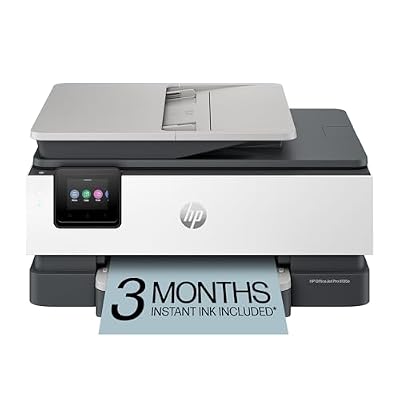
HP OfficeJet Pro 8135e Wireless All-in-One
9.8/10 Our scoreTop scored: 9.4/10 or higher
- Color
- Light Cement
- Size
- one size
- Dimensions
- 13.29 x 18.12 x 9.17 inches
The HP OfficeJet Pro 8135e Wireless All-in-One is an updated home office multifunction unit that merges the core mechanics of the 8100 series with extended warranty options. Delivering print performance rated at 20 pages per minute for black documents and 10 pages per minute for color graphics, the 8135e incorporates a 225-sheet primary paper tray and a 12 page-per-minute monochrome copy engine. The chassis weighs 19 pounds and measures 13.29 inches deep by 18.12 inches wide, keeping workspace requirements manageable for shared home studies or private cubicles.
The scanning system utilizes a flatbed platen along with a 35-sheet one-sided simplex automatic document feeder. Like its sister 8135 model, the 8135e executes automatic two-sided printing, but two-sided scanning requires manual intervention to flip document stacks. Daily operations are driven through a 2.7-inch color touchscreen featuring responsive smartphone-style gestures. Data communication paths are protected by HP Wolf Essential Security, while the printer’s dual-band Wi-Fi circuitry constantly scans for wireless signal attenuation and resolves connection anomalies autonomously.
A central consideration when evaluating this specific machine is the manufacturer’s warranty framework. The standard purchase carries a one-year limited hardware warranty, but buyers are offered the option to extend coverage to two full years upon accepting the HP+ service setup. Activating HP+ requires maintaining active cloud connectivity and using Original HP ink cartridges throughout the machine’s life. For buyers concerned with long-term hardware reliability, this optional second year of factory support provides extra peace of mind, provided your office workflow aligns with continuous internet management and genuine consumable policies.
- Optional two-year extended manufacturer hardware warranty available via HP+ activation
- Simplex automatic document feeder paired with automatic two-sided print duplexing
- Standard 225-sheet paper tray capacity and 2.7-inch color touchscreen controls
- Dual-band Wi-Fi with self-healing reconnection logic and HP Wolf Essential Security
What Sets These Models Apart
Comparing these six multifunction units reveals critical variations in scanner transport engineering, internal paper storage, and throughput velocities across the product lines.
| Printer Model | Print / Copy Speeds | ADF Scanner Mechanism | Paper Input Capacity | Chassis Weight |
|---|---|---|---|---|
| HP OfficeJet Pro 9125 | 22 ppm black / 18 ppm color | Dual-pass 2-sided ADF | 250 sheets (1 tray) | 20.5 lbs |
| HP OfficeJet Pro 9135 | 25 ppm black / 20 ppm color | Single-pass 2-sided ADF | 500 sheets (2 trays) | 26.1 lbs |
| HP OfficeJet Pro 8135 | 20 ppm black / 10 ppm color | Simplex (1-sided) ADF | 225 sheets (1 tray) | 17.6 lbs |
| HP OfficeJet Pro 9730 | 22 ppm black / 18 ppm color | Single-pass 2-sided ADF (up to 11×17) | 500 sheets (2 trays) | 43.0 lbs |
| HP Smart Tank Plus 651 | 10 ppm black copy | Simplex ADF / Flatbed | Integrated tank reservoir | 10.3 lbs |
| HP OfficeJet Pro 8135e | 20 ppm black / 10 ppm color | Simplex (1-sided) ADF | 225 sheets (1 tray) | 19.0 lbs |
Buying Tips for HP All-in-One Printers
When selecting among hp printers all in one wireless fax scan print configurations, understanding the mechanical distinction between automatic document feeders is essential for equipment longevity. A simplex ADF found on home-tier models requires manual handling for two-sided documents, increasing operator error during sensitive fax transmissions. Dual-pass reversing ADF systems automate duplex capture but rely on internal clutching rollers that physically pull the sheet backward, introducing extra mechanical friction over time. For heavy multi-page workflows, a single-pass duplex ADF—as found on the OfficeJet Pro 9135 and 9730—uses dual optical arrays to scan both page sides simultaneously, which substantially minimizes paper path jams and feeder wear.
Firmware architecture and connectivity parameters also require careful upfront planning. Modern HP multifunction printers utilize self-healing dual-band Wi-Fi designed to switch bands automatically when wireless packet collision occurs. However, units designated with an “e” suffix or those enrolled in HP+ services mandate persistent internet connectivity and enforce dynamic security measures that restrict the printer to Original HP ink supplies. If your deployment environment experiences irregular internet access or if administrative policies prohibit cloud-tethered printing equipment, opting for standard non-HP+ hardware versions preserves local offline autonomy.
Finally, consider how print volume and media dimensions influence hardware durability. Inkjet units operating at continuous capacity near their mechanical limits experience faster printhead degradation and roller wear than machines with headroom. If your organization handles strictly text-heavy documentation with no requirement for color graphics, evaluating a dedicated laserjet printer all in one wireless alternative might offer lower mechanical upkeep. However, for multi-faceted tasks requiring color proofing, tabloid layouts, and integrated fax lines, selecting an OfficeJet Pro or Smart Tank unit properly matched to your monthly paper volume ensures reliable long-term service backed by standard manufacturer hardware warranty coverage.
FAQ
How does a single-pass duplex ADF differ from a dual-pass document feeder?
A single-pass automatic document feeder houses two separate optical scan sensors within the transport path, allowing the machine to capture both the front and back of a sheet in a single linear motion. A dual-pass ADF contains only one scan sensor; it feeds the sheet past the sensor, mechanically pulls the paper backward into an internal reversing roller assembly, flips the sheet, and feeds it across the scanner a second time. Single-pass feeding is faster and significantly reduces paper wear and jam risks during high-volume document batches.
Can these HP multifunction printers send faxes without an active analog phone line?
Traditional standalone faxing on these machines utilizes standard RJ-11 analog phone jacks to transmit data across traditional landlines or certified VoIP adapters. However, HP all-in-one models supported by the HP App also offer mobile fax capabilities. This service allows users to transmit digital documents and scanned files as faxes directly from a smartphone, tablet, or PC using an internet connection, bypassing the requirement for a physical telephone cord plugged into the rear of the machine.
What is the functional difference between HP Wolf Pro and HP Wolf Essential Security?
HP Wolf Essential Security provides baseline protection suited for residential and micro-business networks, focusing on password-protected embedded web servers, secure wireless protocols, and basic firmware integrity validation. HP Wolf Pro Security is designed for corporate network endpoints, incorporating enterprise-grade hardware-enforced protection, self-healing firmware algorithms, runtime intrusion detection, and advanced network isolation to prevent printers from becoming vulnerable threat vectors on business networks.
What conditions must be met to maintain the HP+ two-year extended warranty?
To access the two-year extended limited hardware warranty offered on models like the OfficeJet Pro 8135e, users must activate the HP+ service during initial hardware setup. Activation requires setting up an HP account, maintaining an uninterrupted internet connection so the printer can communicate with HP cloud servers, and exclusively utilizing Original HP ink cartridges for the operational life of the printer. Operating the unit offline or inserting non-HP modified cartridges will compromise the extended warranty provisions.
How does the refillable ink system in the Smart Tank Plus 651 compare to standard cartridges?
The HP Smart Tank Plus 651 replaces small disposable plastic cartridges with large internal fluid reservoirs. Users replenish these reservoirs by docking keyed ink bottles into color-coded fill ports, allowing the ink to gravity-drain without manual squeezing or mess. This architecture allows the printer to ship with thousands of pages worth of ink right out of the box, drastically reducing the physical frequency of consumable changes, though the printer chassis itself is lighter and geared toward lower daily copy speeds than heavy-duty OfficeJet Pro business models.
Prices and specifications on this page are read from the Amazon product listing and can change at any time. Scores are out of 10, based on listed specifications and buyer feedback. Nobody at this site handled or measured these products.