Smart Home & Security 6 models
Kwikset Wi-Fi Smart Lock Breakdown: Reliability, Hardware, and Everyday Flaws
As Amazon Associates, we earn from qualifying purchases. This means we may receive a small commission at no extra cost to you if you click through and make a purchase.
Selecting kwikset smart locks wifi deadbolts usually comes down to balancing wireless convenience against battery maintenance and mechanical reliability. Built-in Wi-Fi radios eliminate the need for an external bridge or plug-in gateway, allowing homeowners to modify codes, view access logs, and operate locks remotely through a smartphone. However, connecting directly to a home 2.4 GHz network places heavy continuous power demands on standard AA alkaline cells. For anyone assessing a keyless entry upgrade, understanding how each model handles motor force, wireless protocols, and physical backup cylinders is essential before replacing existing hardware.
This comparison covers six distinct Kwikset models to guide your kwikset smart lock comparison and help determine which hardware fits your entryway. The lineup features direct Wi-Fi deadbolts including the Halo Touchscreen and three Halo Keypad variants, the newer Matter-capable Halo Select, and the HomeConnect 620, which uses Z-Wave 700 Long Range rather than standalone Wi-Fi. While all six share standard deadbolt mounting dimensions and Kwikset installation practices, they diverge significantly in communication standards, keypad interfaces, operational battery life, and smart home platform support.
Which Kwikset Smart Locks Should You Buy
- For clean modern aesthetics and direct app control without a separate bridge, buy the Kwikset Halo Wi-Fi Smart Lock (Touchscreen).
- For tactile pushbutton feedback and an all-metal interior casing, buy the Kwikset 938WIFIKYPD-15S Halo Wi-Fi Enabled Smart.
- For busy households needing physical buttons and high guest code capacity, buy the Kwikset Halo Wi-Fi Smart Lock (Keypad 99380-002).
- For standard exterior doors exposed to weather where one-touch locking is helpful, buy the Kwikset Halo Wi-Fi Smart Lock (Keypad B0D2YZ3TYJ).
- For multi-ecosystem homes requiring future-proof Matter and Thread support, buy the Kwikset Halo Select Smart Lock Keyless.
- For homeowners with a Ring Alarm or Z-Wave network seeking full twelve-month battery life, buy the Kwikset HomeConnect 620 Z-Wave Long Range.
Kwikset Halo Wi-Fi Smart Lock

Kwikset Halo Wi-Fi Smart Lock
9.4/10 Our scoreTop scored: 9.4/10 or higher
- Color
- Matte Black
- Dimensions
- 3.99 x 4.24 x 9.74 Inches
- Weight
- 4.01020854578 Pounds
Best for: Standard exterior doors needing simple one-touch locking
Pros
- One-touch exterior locking button
- Weather-resistant metal housing
- Adjustable deadbolt backset
Cons
- Lacks Apple Home support
- Motor strains if door misaligned
Kwikset Halo Wi-Fi Smart Lock
9.4/10 Our scoreTop scored: 9.4/10 or higher
- Color
- Venetian Bronze
- Dimensions
- 3.99 x 4.24 x 9.74 inches
- Weight
- 1 pounds
Best for: Busy family entries managing frequent guest access
Pros
- Stores 250 access codes
- Tactile backlit buttons
- Instant tamper alert notifications
Cons
- Quarterly battery replacements
- Requires strong 2.4 GHz signal

Kwikset Halo Wi-Fi Smart Lock
8.2/10 Our score
- Color
- Matte Black
- Dimensions
- 3.99 x 4.24 x 9.74 Inches
- Weight
- 3.6 Pounds
Best for: Touchscreen lovers wanting direct Wi-Fi control
Pros
- Backlit capacitive touchscreen
- Direct Wi-Fi without hub
- Grade AAA deadbolt rating
Cons
- Faster battery depletion
- Touchscreen collects fingerprints
The Kwikset Halo Wi-Fi Smart Lock touchscreen model provides direct wireless connectivity to residential doorways without requiring a secondary hub. Its matte black exterior assembly features a backlit capacitive glass panel that displays digits upon activation, creating a low-profile look on the door. Homeowners can program up to 250 unique user access codes through the Kwikset mobile app, track real-time entry logs, and link the deadbolt to Amazon Alexa or Google Home for voice-assisted operation.
When assessing kwikset wifi deadbolt reliability, users must recognize that running both a motorized latch mechanism and a persistent 2.4 GHz wireless receiver from four AA batteries requires regular battery monitoring. The smooth glass face requires clean touch input and can collect visible fingerprints over time, necessitating occasional cleaning to maintain touch sensitivity. This lock works well for buyers who prefer a streamlined contemporary appearance and direct smartphone management, though users who frequently enter with gloves or wet hands may prefer physical pushbuttons.
- Direct Wi-Fi integration allows remote locking, unlocking, and activity tracking without a separate hub.
- Backlit touchscreen interface supports up to 250 customizable access codes and automated locking durations.
- Intrusion detection sends instantaneous app notifications if incorrect codes are entered or tampering is detected.
- Grade AAA certified mechanical build fits doors between 1-3/8 inches and 1-3/4 inches thick with adjustable backset.
Kwikset 938WIFIKYPD-15S Halo Wi-Fi Enabled Smart

Kwikset 938WIFIKYPD-15S Halo Wi-Fi Enabled Smart
8.8/10 Our score
- Color
- Satin Nickel
- Dimensions
- 10.5 x 5.8 x 4.6 inches
- Weight
- 2.5 pounds
Best for: Homeowners wanting tactile buttons and metal construction
Pros
- Raised physical keypad buttons
- All-metal interior housing
- Fast SmartKey re-keying
Cons
- Larger interior chassis
- One-year electronics warranty
The Kwikset 938WIFIKYPD-15S Halo Wi-Fi Enabled Smart pairs physical keypad buttons with an all-metal interior housing in a satin nickel finish. Unlike glass touchscreens that can struggle in heavy precipitation or extreme cold, the tactile pushbuttons provide positive physical feedback with every press. An interior status LED light gives occupants immediate visual confirmation of the latch position from inside the home, removing any guesswork before heading to sleep.
The exterior lock cylinder features kwikset keyless entry door lock convenience backed by kwikset smartkey security, allowing owners to re-key the physical lock cylinder in seconds using the included tool. By connecting through the Kwikset Cloud infrastructure, this deadbolt supports remote status checks and voice integration with Amazon Alexa and Google Assistant. It suits households that prioritize durable mechanical pushbuttons over glass screens, though installers should ensure careful door alignment to prevent latch friction that strains the motor.
- Tactile backlit keypad buttons offer positive mechanical engagement in diverse weather environments.
- All-metal interior chassis includes a clear status LED indicator for visual bolt verification.
- Integrated SmartKey cylinder permits rapid re-keying to match existing traditional house keys.
- Cloud-enabled Wi-Fi radio enables remote app operation and compatibility with Amazon Alexa and Google Assistant.
Kwikset Halo Wi-Fi Smart Lock
Kwikset Halo Wi-Fi Smart Lock
8.2/10 Our score
- Color
- Matte Black
- Dimensions
- 3.99 x 4.24 x 9.74 Inches
- Weight
- 3.6 Pounds
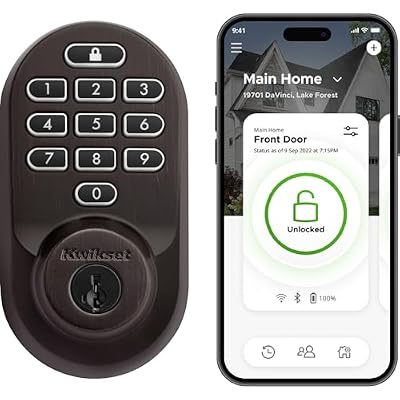
This keypad edition of the Kwikset Halo Wi-Fi Smart Lock (model number 99380-002) is designed for doorways with frequent family, guest, or service traffic. The illuminated keypad layout ensures straightforward operation in unlit conditions, allowing visitors to enter assigned access codes without navigating a smartphone interface. Property owners can schedule temporary, recurring, or permanent PINs for up to 250 users directly from the mobile app.
In everyday use, physical pushbuttons provide reliable code entry under challenging outdoor conditions, including freezing temperatures and wet weather. The deadbolt also features geofencing auto-unlock options alongside customizable auto-lock countdowns to secure the door after entry or exit. The mechanical hardware carries Kwikset’s lifetime finish and mechanical guarantee alongside a one-year electronic component warranty, making it a reliable option for primary entry doors that experience regular daily traffic.
- Keypad accommodates up to 250 unique user codes for family members, maintenance workers, and guests.
- Geofencing technology and customizable auto-lock timers automate perimeter security during arrival and departure.
- SmartKey cylinder design defends against picking techniques while enabling instant mechanical re-keying.
- Real-time intrusion notifications alert homeowners to invalid code attempts or physical tampering.
Kwikset Halo Wi-Fi Smart Lock
Kwikset Halo Wi-Fi Smart Lock
9.4/10 Our scoreTop scored: 9.4/10 or higher
- Color
- Venetian Bronze
- Dimensions
- 3.99 x 4.24 x 9.74 inches
- Weight
- 1 pounds
Featuring a complete metal exterior casing, this iteration of the Kwikset Halo Wi-Fi Smart Lock is built to handle regular exterior weather exposure. The illuminated keypad includes a dedicated one-touch lock button, enabling residents to throw the deadbolt immediately upon leaving without keying in a full pass code or opening the companion app. Measuring 3.99 by 4.24 by 9.74 inches, the exterior and interior sections mount cleanly into standard door cutouts using basic hand tools.
Managing ongoing kwikset halo battery life requires maintaining smooth bolt travel into the strike plate. Because this unit relies on continuous wireless monitoring and a motorized drive, latch binding against the doorframe forces the internal motor to work harder, accelerating power drain. For households upgrading from older mechanical deadbolts, this model provides straightforward code assignment and voice assistant support, though it lacks the Matter and Thread interoperability present on newer connected hardware.
- Heavy-duty metal construction with weather-resistant sealing safeguards electronics on exterior entryways.
- Dedicated one-touch exterior locking button secures the deadbolt quickly upon departure.
- Onboard Wi-Fi communication manages user access schedules and event logs without an external gateway.
- Fits residential door thicknesses from 1-3/8 inches to 1-3/4 inches with an adjustable deadbolt backset.
Kwikset Halo Select Smart Lock Keyless

Kwikset Halo Select Smart Lock Keyless
7.8/10 Our score
- Brand Name
- Kwikset
- Recommended Uses For Product
- Home
- Number of Pieces
- 1
Best for: Smart homes integrating Matter and Apple Home
Pros
- Matter capable over Thread
- Works with Apple Home and Alexa
- Batteries and keys included
Cons
- No physical button feedback
- Requires Thread border router
The Kwikset Halo Select Smart Lock Keyless deadbolt introduces updated connectivity by pairing standard Wi-Fi management with Matter over Thread capability. Unlike earlier Halo models that restrict voice control primarily to Alexa and Google Home, the Halo Select integrates natively into Apple Home environments as well. Users can govern access through the Kwikset mobile app or incorporate the deadbolt into broad Matter automations using an existing Thread border router.
The satin nickel exterior features a bright LED backlit touchscreen that illuminates upon contact, storing up to 250 access codes with geofence auto-unlock support and real-time tampering notifications. Grade AAA certified mechanical construction ensures high physical resistance to forced entry, and the package comes supplied with two physical keys, installation hardware, batteries, and a SmartKey learn tool. This deadbolt is the logical choice for smart homes running multiple automation platforms, though battery replacements remain a standard maintenance requirement when operated primarily over Wi-Fi.
- Dual wireless capabilities support direct Wi-Fi app management alongside Matter integration over Thread.
- Multi-platform compatibility operates smoothly with Apple Home, Amazon Alexa, and Google Home.
- Supplied with two keys, four AA batteries, mounting hardware, and a SmartKey re-keying learn tool.
- Grade AAA certified mechanical hardware housed inside a modern satin nickel casing.
Kwikset HomeConnect 620 Z-Wave Long Range

Kwikset HomeConnect 620 Z-Wave Long Range
8.2/10 Our score
- Color
- Venetian Bronze
- Size
- Traditional
- Dimensions
- 4.25 x 5.375 x 9.813 Inches
Best for: Ring Alarm users prioritizing twelve-month battery life
Pros
- Twelve-month battery longevity
- Z-Wave 700 Long Range range
- Master programming code security
Cons
- Requires separate Z-Wave hub
- No direct Wi-Fi connectivity
The Kwikset HomeConnect 620 Z-Wave Long Range takes an alternate approach to wireless entry by using Z-Wave 700 Long Range technology instead of onboard Wi-Fi. This deadbolt requires a compatible Z-Wave hub, such as a SmartThings controller or a Ring Alarm base station, to access mobile controls and automation routines. By relying on low-power Z-Wave frequencies, the lock achieves a manufacturer-rated twelve months of operation using the four included AA batteries.
For homeowners assembling an integrated home security ecosystem, this lock serves as an effective ring deadbolt smart lock option, employing S2 authenticated encryption and SmartStart QR pairing for simplified setup. Its physical keypad stores up to 250 user codes and features a dedicated programming code to prevent unauthorized changes at the door. While buyers without a compatible smart hub cannot access remote functionality, those with existing hub hardware gain superior battery longevity and dependable wireless range across larger residences.
- Z-Wave 700 Long Range radio offers extensive whole-home transmission range and a twelve-month battery lifespan.
- Integrates directly with Ring Alarm and SmartThings hubs using advanced S2 security encryption.
- Programmable auto-lock settings provide selectable delays of 30 seconds, 1 minute, 3 minutes, 5 minutes, or 10 minutes.
- Keypad features backlit numeric buttons, one-touch locking, and a master programming code function.
What Sets These Models Apart
| Model Name | Interface Style | Wireless Standard | Smart Home Compatibility |
|---|---|---|---|
| Kwikset Halo Wi-Fi Smart Lock (Touchscreen) | Capacitive Touchscreen | Wi-Fi (No Hub Needed) | Amazon Alexa, Google Home |
| Kwikset 938WIFIKYPD-15S Halo Wi-Fi Enabled Smart | Physical Pushbuttons | Wi-Fi (No Hub Needed) | Amazon Alexa, Google Home |
| Kwikset Halo Wi-Fi Smart Lock (Keypad 99380-002) | Physical Pushbuttons | Wi-Fi (No Hub Needed) | Amazon Alexa, Google Home |
| Kwikset Halo Wi-Fi Smart Lock (Keypad B0D2YZ3TYJ) | Physical Pushbuttons | Wi-Fi (No Hub Needed) | Amazon Alexa, Google Home |
| Kwikset Halo Select Smart Lock Keyless | Backlit Touchscreen | Wi-Fi and Matter over Thread | Apple Home, Amazon Alexa, Google Home |
| Kwikset HomeConnect 620 Z-Wave Long Range | Physical Pushbuttons | Z-Wave 700 Long Range | Ring Alarm, SmartThings (Hub Required) |
Buying Tips for Kwikset Smart Locks
Physical door alignment is the most important factor in ensuring long-term motor reliability on any smart deadbolt. When installing your new hardware, verify that the door latches fully against the weatherstripping without requiring you to push, pull, or lift the door handle to turn the deadbolt. If the bolt scrapes against the strike pocket, the internal motor draws significantly more current with each rotation. This mechanical binding leads to repeated motor stalls, jam alerts in the application, and battery depletion within weeks instead of months.
Network signal strength also plays a substantial role in day-to-day deadbolt performance. Kwikset Wi-Fi radios communicate over standard 2.4 GHz network frequencies, which pass through exterior building materials better than 5 GHz channels. When a lock is installed near the edge of your Wi-Fi coverage area, the internal radio repeatedly boosts transmission power to maintain its cloud connection, noticeably increasing power consumption. For buyers weighing these models against competitors like schlage smart locks for front door wifi, checking your 2.4 GHz signal quality at the doorframe before mounting helps prevent intermittent connection drops.
Deciding between touchscreen panels and physical keypad buttons depends heavily on your local climate and personal entry habits. Touchscreens provide a clean, modern exterior aesthetic, but they require direct visual alignment and clean, dry hands to operate smoothly. Raised pushbuttons offer tactile clicks that can be entered by muscle memory in total darkness or while wearing winter gloves. Reviewing who enters your home daily will determine whether a sleek glass profile or tactile numeric durability makes the most sense.
FAQ
How long do batteries usually last in Kwikset Wi-Fi smart locks?
Standard battery lifespan for Kwikset direct Wi-Fi deadbolts is typically between three and six months under normal household conditions. Because Wi-Fi radios require continuous power to stay reachable over cloud networks, they deplete AA batteries faster than locks operating on Z-Wave or local Bluetooth. Ensuring clean deadbolt alignment and maintaining solid 2.4 GHz Wi-Fi signal coverage at the doorframe will help maximize operational life.
What is the functional difference in Kwikset Halo touchscreen vs keypad designs?
Touchscreen versions use a smooth, dark glass panel that illuminates only when touched, delivering a minimalist design that eliminates raised exterior buttons. Keypad models feature individual backlit pushbuttons that depress with tactile physical feedback. Pushbuttons are generally more reliable in wet weather, direct sunlight, and freezing conditions where gloves are worn, whereas touchscreens present a sleeker modern look.
Do Kwikset Wi-Fi locks continue working if the internet goes down?
Yes, all local access features continue to operate normally during internet or Wi-Fi outages. You can lock and unlock the door using assigned keypad codes or the physical backup key. However, remote locking, push status alerts, and access log syncing through the smartphone app remain offline until your local network and internet service are restored.
How does the Kwikset SmartKey security cylinder work?
The SmartKey cylinder is a specialized mechanical locking mechanism designed to resist common picking techniques and physical bumping attacks. It includes a dedicated reset port next to the keyway that allows homeowners to re-key the cylinder to any standard Kwikset key in seconds using the supplied learn tool, avoiding the need to hire a locksmith when keys are lost.
Does the Kwikset HomeConnect 620 work without a smart home hub?
The HomeConnect 620 functions locally as a basic electronic keypad deadbolt without a hub, allowing PIN and key entry. However, to access remote control, app notifications, or voice assistant integrations, it requires pairing to a compatible Z-Wave smart hub, such as a Ring Alarm base station or Samsung SmartThings controller.
Prices and specifications on this page are read from the Amazon product listing and can change at any time. Scores are out of 10, based on listed specifications and buyer feedback. Nobody at this site handled or measured these products.


