Electronics 6 models
Epson All-in-One Printer Comparison: Printhead Longevity, Ink Systems, and Real-World Upkeep
As Amazon Associates, we earn from qualifying purchases. This means we may receive a small commission at no extra cost to you if you click through and make a purchase.
Selecting an epson all-in-one printer requires understanding the mechanical trade-offs between conventional cartridge units and bottle-fed supertanks. Epson builds its machines around permanent piezoelectric printheads, meaning the hardware does not discard its jetting assembly with every empty consumable container. For buyers, this engineering approach makes printhead longevity, nozzle drying vulnerabilities, and duty cycle limits the primary determinants of machine lifespan. WorkForce cartridge units deliver rapid pigment-based output optimized for office text, whereas EcoTank platforms swap frequent cartridge ordering for high-capacity liquid ink wells designed to reduce packaging waste and long-term operating costs.
This review examines six distinct models across Epson’s product portfolio: two traditional cartridge platforms and four continuous-supply tank printers. You will find professional office equipment, dedicated creative imaging hardware, and standard family document engines. Each unit handles page-per-minute speeds, paper capacities, and maintenance cycles differently. Across this epson all in one printer comparison, we break down documented hardware limits, automated document feeder capabilities, and manufacturer warranty exclusions regarding third-party inks to determine which epson all in one printer to buy for your workspace.
Which Epson All-in-One Printers Should You Buy
- High-volume business text and fast pigment printing: choose the Epson Workforce Pro WF-3820.
- Entry-level tank printing for basic home document tasks: choose the Epson EcoTank ET-4800.
- Everyday household color printing with substantial inbox page yields: choose the Epson EcoTank ET-2800.
- Creative media versatility, borderless photos, and direct disc printing: choose the Epson Expression Premium XP-7100.
- Demanding home offices requiring duplex copying, scanning, faxing, and a 250-sheet tray: choose the Epson EcoTank ET-4950.
- Economical renewed duplex printing with sharp color resolution: choose the Epson EcoTank ET-2988.
Epson Workforce Pro WF-3820 Wireless Color

Epson Workforce Pro WF-3820 Wireless Color
8.2/10 Our score
- Color
- Black
- Size
- Large
- Dimensions
- 16.7 x 19.4 x 9.8 inches
Best for: Offices needing high-speed pigment document output
Pros
- Fast 21 black ISO ppm
- 250-sheet paper capacity
- DURABrite pigment ink
Cons
- Requires genuine cartridges
- Substantial 19.4-pound footprint
The Epson Workforce Pro WF-3820 Wireless Color is engineered for document-heavy workloads that demand crisp text reproduction and fast job turnaround. Driven by PrecisionCore Heat-Free Technology, the machine produces 21 ISO pages per minute in black and 11 ISO pages per minute in color, backed by a rapid first-page-out time. Epson equips this platform with DURABrite Ultra instant-dry pigment inks, which resist smudging and produce clean line edges across standard business documents. Document management is supported by a 250-sheet paper tray, automatic two-sided printing, and a 35-sheet automatic document feeder for administrative scanning and multi-page runs.
From an advocate perspective, prospective owners must note that this machine uses an exclusive cartridge architecture. The manufacturer states that the printing system is designed strictly for genuine cartridges, and any damage caused by non-genuine inks will not be covered under the printer’s limited warranty. While offices considering rival heavy-duty hardware like brother printers all in one wireless fax, scan, print alternatives will value the WF-3820’s 40-page-per-minute maximum black copy speed, it remains a heavy machine at 19.4 pounds. It requires steady printing volumes to justify keeping individual replacement cartridges on hand.
- PrecisionCore Heat-Free Technology delivering 21 black and 11 color ISO ppm
- DURABrite Ultra instant-dry pigment ink set for sharp document lines
- 250-sheet main paper tray capacity with a 35-page automatic document feeder
- Flatbed scanner with maximum black copy speeds reaching 40 pages per minute
Epson EcoTank ET-4800 Wireless Color All-in-One

Epson EcoTank ET-4800 Wireless Color All-in-One
9.8/10 Our scoreTop scored: 9.4/10 or higher
- Color
- White
- Size
- One Size
- Dimensions
- 11.8 x 14.8 x 6.7 inches
Best for: Low-volume users wanting basic tank printing
Pros
- EcoFit refillable tanks
- Lightweight 11-pound chassis
- No cartridge waste
Cons
- 10 ppm copy speed
- 1-year EU spare parts
The Epson EcoTank ET-4800 Wireless Color All-in-One transitions users away from recurring cartridge orders by implementing integrated supertanks fed by EcoFit bottles. The refill bottles are keyed to prevent liquid spills or color cross-contamination. Built around Micro Piezo Heat-Free Technology, the unit renders sharp monochrome text and graphics across plain paper stocks while eliminating cartridge shell disposal. A built-in high-resolution flatbed scanner and an integrated color display simplify standalone copying and navigation for domestic users.
This model suits casual home workspaces where page counts are moderate and user convenience is paramount. Weighing just 11 pounds with a compact footprint of 13.6 inches deep by 14.7 inches wide, the ET-4800 fits easily on cramped desks. However, buyers should note that its monochrome copy speed is rated at 10 pages per minute, and its official EU spare part availability is listed at 1 year. If your workflow requires expansive paper capacity or heavy automated sheet-feeding, this model yields ground to the larger EcoTank commercial units.
- Cartridge-free supertank system utilizing keyed EcoFit refill bottles
- Micro Piezo Heat-Free Technology generating detailed documents and color graphics
- Built-in flatbed scanner paired with an integrated color navigation screen
- Lightweight 11-pound chassis suitable for space-constrained home desks
Epson EcoTank ET-2800 Wireless Color All-in-One

Epson EcoTank ET-2800 Wireless Color All-in-One
9.2/10 Our score
- Color
- Black
- Size
- Medium
- Dimensions
- 16.99999998266 x 15.99999998368 x 9.29921258894 inches
Best for: Everyday households printing mixed color documents
Pros
- Up to 7,500 color pages
- Compact desktop design
- 90-cartridge bottle yield
Cons
- Modest 10 ISO ppm
- No auto duplexing listed
The Epson EcoTank ET-2800 Wireless Color All-in-One is aimed directly at family households that balance homework sheets, forms, and occasional color craft printing. Epson packages this cartridge-free unit with enough ink to print up to 4,500 monochrome pages and 7,500 color pages, which the listing estimates as equivalent to roughly 90 individual cartridges. The bottle system supplies cyan, magenta, yellow, and black reservoirs directly, curbing ongoing consumable purchases and reducing environmental plastic waste.
Media handling on this model includes plain paper, envelopes, and glossy photo paper, supported by Micro Piezo Heat-Free output at 10 ISO pages per minute. The listing explicitly states that the limited warranty excludes hardware damage resulting from non-genuine ink formulations. While its 10-page-per-minute copy speed and flatbed design handle routine tasks smoothly, it lacks built-in automatic duplexing and an automated document feeder. Busy home administrators processing thick, double-sided paperwork packets may find the manual feed steps restrictive.
- High-capacity ink supply rated up to 4,500 black and 7,500 color pages from inbox bottles
- Micro Piezo Heat-Free system printing up to 10 ISO pages per minute
- Versatile media feed handling plain paper, envelopes, and glossy photo sheets
- Flatbed document scanner combined with mobile device printing compatibility
Epson Expression Premium XP-7100 Wireless Color

Epson Expression Premium XP-7100 Wireless Color
8.6/10 Our score
- Color
- Black
- Size
- Small
- Dimensions
- 17.2 x 23.5 x 8.1 inches
Best for: Creative home users printing photos and DVDs
Pros
- 5-color photo system
- Auto 2-sided scan and print
- 3-inch touchscreen display
Cons
- Higher ink replacement frequency
- Heaviest unit at 21.5 pounds
The Epson Expression Premium XP-7100 Wireless Color separates itself from general office printers by prioritizing specialized photographic output and creative media handling. Featuring a 5-color ink configuration, this inkjet engine produces vibrant borderless photo prints up to 8 by 10 inches, while maintaining sharp text rendering on standard stationery. It includes dedicated trays for specialty paper and direct DVD/CD printing. A prominent 4.3-inch touchscreen allows users to preview, edit, and print images straight from USB flash storage or SD memory cards.
Workflow automation is a core strength of the XP-7100. It provides a 30-page automatic document feeder along with full auto two-sided printing, copying, and scanning. The machine hits black-and-white copy speeds of 15.8 pages per minute with a maximum limit of 60 copies per run. At 21.5 pounds, it is the heaviest unit in this comparison and relies on traditional genuine cartridges. This means running costs per page will be higher than an epson ecotank all in one printer, making this model ideal for visual hobbyists rather than continuous high-volume administrative operations.
- 5-color printing engine generating borderless photos up to 8 by 10 inches
- Specialty media handling including rear paper feeds and direct DVD/CD labeling
- Automated 30-page document feeder with full auto 2-sided print, copy, and scan
- Large 4.3-inch intuitive color touchscreen with direct SD card and USB ports
Epson EcoTank ET-4950 Wireless Duplex All-in-One

Epson EcoTank ET-4950 Wireless Duplex All-in-One
9.8/10 Our scoreTop scored: 9.4/10 or higher
- Color
- Black
- Dimensions
- 13.7 x 14.8 x 9.4 inches
- Weight
- 16.1 Pounds
Best for: High-volume home offices needing duplex and fax
Pros
- Auto duplex print copy scan
- 6,600 black page yield
- 250-sheet paper tray
Cons
- Moderate 9 color ppm speed
- Larger office footprint
Designed for intensive micro-business and telecommuting requirements, the Epson EcoTank ET-4950 Wireless Duplex All-in-One expands tank capacity into an enterprise-ready configuration. Powered by PrecisionCore Heat-Free technology, this seventh-generation supertank features a duty cycle twice as robust as its predecessor. It achieves print speeds of 18 ISO pages per minute in black and 9 ISO pages per minute in color with zero required warmup time. The included ink bottles deliver up to 6,600 black and 5,500 color pages, matching the output volume of roughly 80 standard ink cartridges.
The hardware configuration targets administrative autonomy. It features a 250-sheet paper drawer, an automatic document feeder, auto duplexing across printing, copying, and scanning, as well as integrated standalone faxing. Those researching an epson all in one printer/fax/scanner setup will appreciate the ET-4950’s flatbed and sheet-fed digitizing versatility, combined with an EU spare part availability rating of 3 years. The 2.4-inch color display provides clear menu navigation, establishing this 16.1-pound machine as the primary choice for sustained paperwork volume.
- PrecisionCore Heat-Free engine delivering 18 black and 9 color ISO ppm
- Substantial inbox ink yield reaching up to 6,600 black and 5,500 color pages
- Full auto-duplex capabilities across printing, copying, and scanning workflows
- Integrated fax hardware and high-capacity 250-sheet lower paper cassette
Epson EcoTank ET-2988 Wireless All-in-One Color
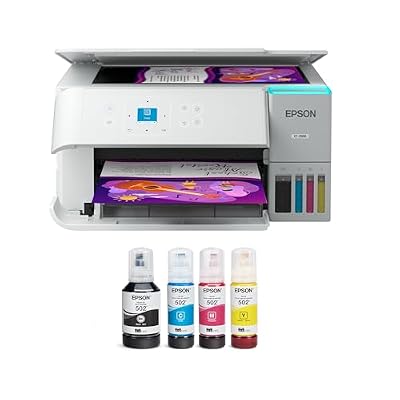
Epson EcoTank ET-2988 Wireless All-in-One Color
9.4/10 Our scoreTop scored: 9.4/10 or higher
- Color
- White
- Dimensions
- 13.7 x 14.8 x 7.4 inches
- Weight
- 11.5 pounds
Best for: Budget-conscious households seeking renewed tank value
Pros
- Up to 3 years ink included
- Auto 2-sided printing
- High 4800 x 1200 dpi
Cons
- Amazon Renewed unit
- 100-sheet paper capacity
The Epson EcoTank ET-2988 Wireless All-in-One Color arrives via the Amazon Renewed program, offering a factory-refurbished pathway to seventh-generation supertank technology. The unit includes ink reservoirs rated for up to 3 years of printing, covering up to 6,600 black and 5,500 color pages from its initial set. Operating on PrecisionCore Heat-Free mechanics, the printer achieves speeds up to 15 black and 8 color ISO pages per minute, delivering zero warmup time from sleep mode.
Despite its modest desk presence and low weight of 11.5 pounds, the ET-2988 incorporates automatic two-sided printing, a 100-sheet paper tray, and high-definition 4800 x 1200 dpi print resolution. It connects seamlessly through the Epson Smart Panel application, Apple AirPrint, and Mopria standards. Prospective buyers must acknowledge that the 100-sheet input tray requires more frequent replenishment during multi-chapter print jobs. The product’s limited warranty explicitly bars coverage for damage induced by non-genuine inks.
- Renewed supertank platform supplied with up to 6,600 black and 5,500 color pages
- PrecisionCore Heat-Free system printing 15 black and 8 color ISO ppm
- High-resolution 4800 x 1200 dpi output with automatic two-sided document printing
- 1.44-inch color display combined with broad mobile and wireless printing support
What Sets These Models Apart
| Model | Ink Delivery System | Rated Print Speed (ISO ppm) | Input Paper Capacity | Duplex Capabilities |
|---|---|---|---|---|
| Epson Workforce Pro WF-3820 | DURABrite Ultra Cartridges | 21 Black / 11 Color | 250 Sheets | Automatic 2-Sided Print |
| Epson EcoTank ET-4800 | EcoFit Refillable Tanks | Listing does not specify ppm | Listing does not specify | Manual Duplex |
| Epson EcoTank ET-2800 | EcoFit Refillable Tanks | 10 Black / Color unspecified | Listing does not specify | Manual Duplex |
| Epson Expression Premium XP-7100 | 5-Color Ink Cartridges | Listing does not specify ppm | Listing does not specify | Auto 2-Sided Print, Copy, Scan |
| Epson EcoTank ET-4950 | EcoFit Refillable Tanks | 18 Black / 9 Color | 250 Sheets | Auto 2-Sided Print, Copy, Scan |
| Epson EcoTank ET-2988 | EcoFit Refillable Tanks | 15 Black / 8 Color | 100 Sheets | Automatic 2-Sided Print |
Buying Tips for Epson All-in-One Printers
Understanding piezoelectric printhead upkeep is essential before committing to any Epson inkjet. Unlike thermal inkjet architectures found in some hp printers all in one wireless hp officejet pro printers, Epson printheads rely on mechanical crystal pulses rather than heat to eject droplets. Because the printhead is a permanent fixture rather than an element integrated into a disposable cartridge, dried ink inside the micro-nozzles can disrupt printing. Leaving an EcoTank or WorkForce device unpowered for months invites clogging. Users with irregular, sparse printing schedules often face extensive nozzle-cleaning cycles, which consume liquid ink and fill internal waste ink pads. If your usage involves weeks of complete inactivity, a toner-based laserjet printer all in one wireless alternative eliminates fluid drying concerns entirely.
Media handling requirements should dictate whether you purchase an entry-level home unit or an office-grade workstation. Basic supertanks like the ET-2800 feature standard flatbed glass, requiring manual page turning and manual sheet flipping for double-sided forms. Upgrading to a platform like the ET-4950 or XP-7100 introduces auto-duplexing mechanisms that automate scanning and copying for multi-page documents without physical oversight. Always examine whether your routine involves multi-page legal contracts, envelopes, or optical discs, as media trays differ substantially across these chassis.
Pay close attention to manufacturer warranty clauses regarding third-party consumables. In every listing evaluated here, Epson explicitly highlights that damage resulting from non-genuine inks is not covered under the limited warranty. While third-party bulk inks and clone cartridges are common, their chemical viscosities and dye formulations can impact internal printhead channels. For equipment intended to serve for years, maintaining warranty protections requires calculating consumable budgets using genuine Epson bottles or cartridges.
FAQ
How does PrecisionCore Heat-Free technology differ from standard Micro Piezo printing?
PrecisionCore Heat-Free technology is an evolution of Epson’s original Micro Piezo system. It utilizes higher-density firing elements that increase nozzle counts per inch, enabling faster output speeds such as the 21 ISO ppm achieved on the WF-3820. Both systems operate without thermal heat, reducing startup delay and power draw, but PrecisionCore chips offer faster first-page delivery and support heavy office duty cycles.
Can using third-party inks void an Epson printer warranty?
Epson specifies across its listings that damage caused by the use of non-genuine ink is excluded from limited warranty coverage. While federal consumer law prevents manufacturers from voiding an entire machine warranty simply because non-original supplies were installed, any mechanical failure, clog, or electrical breakdown traced directly to third-party fluid will result in denied warranty claims.
What should you do if an Epson EcoTank printhead becomes clogged?
If printouts exhibit banding or missing colors, run a nozzle check pattern via the printer settings screen. If broken lines appear, initiate a standard printhead cleaning cycle through the software or front panel. Allow the printer to rest for several hours between intensive cleanings so the ink can settle. Prevent clogs by printing at least one colored document every week and never unplugging the unit while the printhead is traversing.
Is a cartridge-based printer more reliable than an EcoTank model for occasional printing?
Neither system enjoys prolonged inactivity, as both rely on permanent piezo printheads where liquid ink can dry inside narrow channels. However, if a standard cartridge printhead suffers an unrecoverable clog, resolving it may require professional service. Supertanks contain vastly more ink, which makes running nozzle flushes less financially punitive than draining expensive, small-volume cartridges during cleaning routines.
What does EU spare part availability mean for long-term printer maintenance?
The EU spare part duration denotes how long the manufacturer officially guarantees the production and distribution of replacement mechanical parts following the release of a machine. For example, the ET-4950 lists a 3-year spare part window, while the ET-4800 and ET-2800 specify 1 year. Longer durations indicate stronger long-term repairability for core feeding and electronic components.
Prices and specifications on this page are read from the Amazon product listing and can change at any time. Scores are out of 10, based on listed specifications and buyer feedback. Nobody at this site handled or measured these products.