Tools & Garden 6 models
Cricut Cutting Tools Breakdown: Choosing Reliable Blades and Accessories
As Amazon Associates, we earn from qualifying purchases. This means we may receive a small commission at no extra cost to you if you click through and make a purchase.
Selecting the right cricut cutting tools requires an understanding of machine clearance, cutting pressure, drive housing mechanics, and blade geometry. Many crafters encounter binding motors, torn cardstock, or ruined cutting mats simply because they paired a heavy-duty blade with an incompatible machine chassis or attempted to force dense media through a standard fine-point blade. Cricut designs distinct accessory categories ranging from handheld post-processing implements to mechanized drive housings driven by proprietary gear assemblies. Evaluating the technical boundaries of each implement ensures you invest only in the hardware capable of executing your intended materials without mechanical failure.
This cricut cutting tools comparison examines six primary cutting implements and accessory kits from the Cricut catalog, analyzing how their construction, steel hardness, and drive requirements impact your workshop reliability. The products covered include manual hand assemblies like the seven-piece prep kits as well as motorized components like rotary knife housings, steep-angled deep blades, QuickSwap metal inscribing tips, and dual-carriage scoring styluses. We break down the differences in blade angle, material thickness capacities up to 1.5mm and beyond, and the strict machine compatibility splits between the Explore and Maker series so you know exactly which cricut cutting tools to buy for your crafting setup.
Which Cricut Cutting Tools Should You Buy
- For hobbyists seeking a comprehensive manual prep set with a portable sliding trimmer and scoring pen, select the Cricut Essential Tool.
- For Cricut Maker owners cutting structural materials like 3/32-inch balsa wood, matboard, and tooling leather, purchase the Cricut Knife Blade and Drive Housing.
- For Explore and Maker users needing to slice through dense 1.5mm materials such as magnet sheets, rubber, and stiffened felt, choose the Cricut Deep.
- For high-volume vinyl and iron-on production crafters requiring specialized weeding hooks, an XL scraper, and a brayer, buy the Cricut Ultimate Toolset.
- For Maker creators engraving customized text, dog tags, nameplates, and decorative flourishes onto metal sheets or acrylic, invest in the Cricut Engraving Tip.
- For greeting card and dimensional packaging crafters who want seamless fold creasing directly in their dual carriage, install the Cricut Scoring Stylus.
Cricut Essential Tool

Cricut Essential Tool
8.0/10 Our score
- Color
- Core
- Size
- One Size
- Dimensions
- 10.25 x 6.5 x 1 inches
Best for: Everyday paper and vinyl trimming
Pros
- Includes portable paper trimmer
- Handheld scoring stylus included
- Complete basic manual set
Cons
- Manual trimmer only
- Lacks heavy material blades
The Cricut Essential Tool set is a comprehensive seven-piece manual accessory kit engineered to handle material prep and post-cut finishing. Operating entirely as manual hand implements, this collection includes a portable paper trimmer, a handheld scoring stylus, a curved weeding tool, an edge scraper, precision craft scissors, and reverse-grip tweezers. Unlike automated machine blades that mount directly into machine carriages, this kit manages the tactile steps required before and after your cutting machine runs, serving as an all-in-one companion for everyday adhesive vinyl, cardstock, and heat transfer projects.
From an operational standpoint, this collection suits crafters who want unified, ergonomic tools for slicing raw roll goods down to mat size and lifting delicate cutouts without ripping the paper fibers. The included portable trimmer provides clean straight-edge slicing without dragging, while the scraper ensures smooth transfer tape burnishing against stubborn vinyl decals. Crafters managing high-volume sticker or decal workflows will find that pairing this package with a dedicated cricut weeding tool set provides immediate tactile control when weeding microscopic negative spaces.
The limitation of the cricut essential tool set lies in its manual nature; it does not expand the mechanized cutting capabilities of your smart machine itself. While the included scoring stylus can be inserted into compatible machine clamps, the remainder of the kit relies on hand pressure and manual alignment. It serves as an essential foundational accessory kit rather than an upgrade to machine cutting depth.
- Seven-piece complete manual kit featuring a portable trimmer, scoring stylus, weeder, scraper, scissors, and tweezers
- Engineered for precise manual slicing, scoring, burnishing, lifting, and weeding across vinyl, paper, and iron-on
- Manual operation mode that complements machine workflows across both small craft projects and business batches
- Lightweight and portable layout designed for organized desktop storage
Cricut Knife Blade and Drive Housing

Cricut Knife Blade and Drive Housing
9.2/10 Our score
- Color
- Original Version
- Size
- By The Yard
- Dimensions
- 5.25 x 3 x 0.95 inches
Best for: Maker owners cutting thick wood
Pros
- Cuts balsa up to 3/32-inch
- Durable German carbide steel
- Motorized drive housing included
Cons
- Maker machines only
- Desktop computer software required
The Cricut Knife Blade and Drive Housing is an automated, heavy-duty mechanical cutting assembly engineered exclusively for the Maker family of smart cutting machines. Constructed from premium 12mm German carbide steel, this blade is built to make multi-pass cuts through dense, dimensional media that would instantly stall or deflect a standard fine-point blade. The assembly incorporates a specialized top-mounted brass drive gear that locks into the Adaptive Tool System of the machine, giving the cutting unit full 360-degree directional steering during complex cuts.
This automated blade is built specifically for makers who build architectural models, wooden puzzles, structured leather goods, and thick chipboard boxes. The knife blade cuts balsa wood up to 3/32 of an inch, basswood up to 1/16 of an inch, tooling leather, garment leather, Cricut chipboard, and heavy matboard. However, the listing explicitly notes that designs cut with this tool must feature cut details larger than 0.75 inches to prevent the blade from twisting and gouging the workpiece or snapping under torsional load.
Reliability considerations demand careful attention to software and hardware limits. The cricut cutting machines in the Explore series cannot drive this tool because they lack the motorized drive gear assembly inside carriage clamp B. Furthermore, the manufacturer specifies that the cricut knife blade and drive housing requires the desktop computer version of Design Space; knife blade operations are incompatible with iOS and Android mobile applications due to the heavy computing power needed to process multi-pass cut paths.
- Premium 12mm German carbide steel blade paired with a motorized drive housing
- Cuts dense structural materials including balsa wood, basswood, tooling leather, garment leather, chipboard, and matboard
- Cuts intricate shapes with minimum detail sizes of 0.75 inches or larger
- Restricted strictly to Cricut Maker machines using desktop computer software
Cricut Deep

Cricut Deep
9.6/10 Our scoreTop scored: 9.4/10 or higher
- Color
- Black
- Dimensions
- 1 x 4.5 x 3 Inches
- Weight
- 0.039903669422 Pounds
Best for: Cutting dense materials on Explore
Pros
- Steep 60-degree cutting angle
- Cuts materials up to 1.5mm
- Explore and Maker compatible
Cons
- Not for rigid hardwoods
- Passive drag cutting only
The Cricut Deep cut blade and housing is an essential cutting accessory designed to bridge the gap between lightweight paper blades and motorized wood-cutting assemblies. Featuring a 1-1/8-inch blade supported by a 2-1/4-inch deep cut housing, this tool features a steeper 60-degree blade angle compared to the standard 45-degree angle found on general-purpose craft blades. The steeper profile, combined with ultra-hard German carbide steel, allows the tip to slice downward through media up to 1.5mm in thickness without excessive side-wall drag.
This blade is ideal for hobbyists who frequently encounter thick cardstock, magnetic sheets, stiffened felt, cardboard, foam sheets, and rubber stamp blanks. Because the cricut deep point blade uses a standard passive drag mechanism rather than an active drive gear, it provides full cross-platform utility. It functions inside both the Cricut Maker and the broader Cricut Explore machine lineup, including the legacy Explore One, Explore Air, and Explore Air 2 units, making it one of the most versatile upgrades available for crafters utilizing an earlier generation cricket cutter machine.
While the deep cut housing easily tackles thicker materials up to 1.5mm, it remains a passive drag blade. It cannot replicate the multi-pass torque of a motorized knife blade on dense hardwoods or rigid chipboard. Trying to cut materials that exceed its 1.5mm physical clearance will result in the aluminum housing collar dragging across the material surface, skewing the cut alignment and potentially dislodging the sheet from your grip mat.
- Steep 60-degree cutting angle manufactured from wear-resistant German carbide steel
- Capable of cutting through over 50 dense materials up to 1.5mm in total thickness
- Full cricut blades compatibility spanning both Cricut Maker and Cricut Explore machine families
- Includes both the 1-1/8 inch deep-cut blade and the corresponding 2-1/4 inch deep housing
Cricut Ultimate Toolset

Cricut Ultimate Toolset
8.0/10 Our score
- Color
- Blue
- Dimensions
- 10.24 x 14.17 x 0.1 Inches
Best for: High-volume vinyl weeders and prep
Pros
- Dual specialized weeding picks
- Extra-large burnishing scraper
- Updated ergonomic grips
Cons
- No paper trimmer included
- Lacks machine-mountable tools
The Cricut Ultimate Toolset is an expanded seven-piece manual workspace kit designed to maximize speed, ergonomics, and accuracy across large production runs. Finished in a sleek blue visual aesthetic, this suite includes a standard weeder, a specialized hook weeder, a wide-blade spatula, an extra-large scraper, fine-point small scissors, heavy-duty large scissors, and an essential craft brayer. The blades feature durable stainless steel construction, with ceramic finishes integrated on designated contact zones to resist adhesive contamination.
This kit is specifically targeted toward production-heavy crafters and small business operators who handle extensive heat-transfer vinyl and adhesive signage. The dual weeder configuration allows you to tackle different cut profiles; the standard pick handles open negative areas, while the hook weeder provides leverage for extracting microscopic nested centers in script typography. The broad surface area of the wide spatula allows you to gently peel lightweight papers from sticky mats without curling the edges, while the brayer provides uniform roller pressure to eliminate air pockets when mounting fabric, leather, or thick cardstock to your mat.
Because the cricut ultimate toolset emphasizes post-cut separation and mat preparation, it does not include a linear cutting trimmer or scoring stylus like the Essential kit does. Its utility lies entirely in comfort and speed during repetitive manual tasks, featuring updated ergonomic grips that prevent hand fatigue during marathon weeding sessions. It acts as an operational efficiency kit for crafters who already own a reliable trimmer.
- Seven-piece manual layout containing a weeder, hook weeder, wide spatula, XL scraper, fine scissors, large scissors, and brayer
- Updated ergonomic handles engineered for enhanced control and reduced hand strain during lengthy crafting tasks
- Stainless steel construction paired with specialized ceramic finish types
- Universal manual companion for all smart cutting machine formats and mat types
Cricut Engraving Tip
Cricut Engraving Tip
9.6/10 Our scoreTop scored: 9.4/10 or higher
- Color
- Silver
- Dimensions
- 0.7 x 3 x 5.25 inches
Best for: Permanent engraving on metal and glass
Pros
- Interchangeable QuickSwap housing
- German carbide steel tip
- Engraves metal and acrylic
Cons
- Incompatible with Explore machines
- Tip wears with hard metals
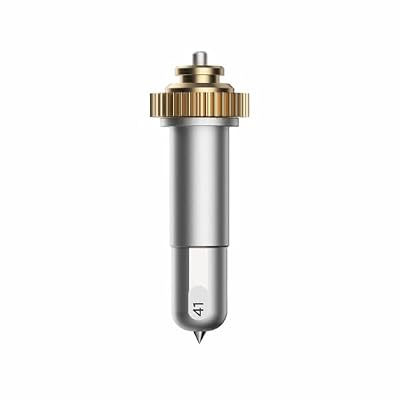
The Cricut Engraving Tip brings permanent dimensional etching to your crafting arsenal via the QuickSwap housing ecosystem. Built from hard German carbide steel, this pointed tool mounts directly into the carriage of compatible machines to scribe permanent designs, decorative flourishes, monograms, and custom text into hard surfaces. The listing specifies that the tool functions smoothly on aluminum sheets, anodized metal plates, tooling leather, acrylic panels, and glass, opening wide creative avenues for personalized jewelry, dog tags, and custom decor.
The tool’s modularity is its primary technical advantage. The cricut engraving tip quickswap assembly consists of the engraving tip itself and the motorized QuickSwap drive housing. Crafters who already own a QuickSwap drive collar can depress the plunger at the top of the housing to pop off the engraving tip and swap on other compatible accessories, such as scoring wheels, debossing tools, perforation blades, or wavy blades. This modular design saves workspace storage while utilizing the Maker’s adaptive gear system to maintain controlled downward force throughout the engraving cycle.
From a hardware perspective, buyers must note that this tool is compatible strictly with the Cricut Maker line. The QuickSwap drive system requires the motorized gear clamp unique to Maker units and cannot be recognized or driven by any Cricut Explore model. Attempting to install this housing into an Explore clamp will result in mechanical binding, as the Explore cannot actuate the QuickSwap plunger mechanism.
- Durable German carbide steel engraving tip designed for permanent linear inscribing
- Scribes intricate text, monograms, and decorative patterns into metal, leather, acrylic, and glass
- QuickSwap housing system allows rapid tool tip interchangeability with other scoring and crafting heads
- Strictly compatible with Cricut Maker hardware; incompatible with the Explore family
Cricut Scoring Stylus

Cricut Scoring Stylus
8.4/10 Our score
- Color
- Multicolour
- Size
- One Size
- Dimensions
- 10.25 x 3 x 0.2 inches
Best for: Card makers scoring clean folds
Pros
- Simultaneous score and cut workflow
- One-year limited warranty
- Explore and Maker compatible
Cons
- Single-line creasing only
- Not for heavy chipboard
The Cricut Scoring Stylus is a streamlined, non-cutting metal creasing tool engineered to create clean fold lines in paper, cardstock, and light cardboard. Finished in a subtle lilac hue, the stylus functions by exerting controlled vertical pressure against paper fibers to compress them along a designated vector, allowing the crafter to create crisp folds for greeting cards, gift envelopes, dimensional boxes, and architectural papercrafts without tearing the surface grain.
The most compelling mechanical feature of the cricut scoring stylus is its workflow efficiency within the machine clamp architecture. In Cricut Explore and Maker machines, the scoring stylus snaps securely into accessory Clamp A, while your primary cutting blade remains locked inside Clamp B. This dual-housing setup enables the machine to score fold lines and cut perimeter profiles in a single automated job cycle, completely eliminating the need to pause the machine, unload the mat, and swap physical tools mid-project.
While the scoring stylus offers broad compatibility and includes a 1-year limited warranty, it exerts a single line of indentation based purely on the downward spring tension of Clamp A. For standard paper and light cardstock, this creates an immaculate crease. However, when working with ultra-dense corrugated cardboard or heavy multi-ply chipboard, the stylus may not indent deeply enough to prevent cracking along the fold, requiring crafters on Maker hardware to consider heavy motorized scoring wheels instead.
- Precision metal scoring tool designed to press crisp fold lines for cards, envelopes, and 3D boxes
- Installs directly into Clamp A, allowing simultaneous scoring and cutting without tool swapping
- Broad operational compatibility across both Cricut Explore and Cricut Maker cutting platforms
- Backed by an official 1-year limited manufacturer warranty from Cricut
What Sets These Models Apart
Understanding the mechanical differences between manual hand tools, motorized adaptive drive housings, and passive drag blades is essential for protecting your cutting hardware from premature failure. Placing an unpowered drag blade into dense wood will cause it to snag and ruin your materials, while attempting to run a Maker-exclusive gear housing in an Explore clamp can damage the carriage mechanism. Reviewing tool specifications side-by-side reveals exactly where each tool excels.
| Product Name | Tool Type | Machine Compatibility | Primary Material Suitability |
|---|---|---|---|
| Cricut Essential Tool | Manual Hand Tool Kit (7 Pieces) | Universal Manual (All Machines) | Adhesive Vinyl, Cardstock, Iron-On, Paper |
| Cricut Knife Blade and Drive Housing | Motorized Drive Gear Cutting Blade | Cricut Maker Only (Desktop Only) | Balsa Wood, Basswood, Tooling Leather, Chipboard |
| Cricut Deep | Passive Drag Cutting Blade (60 Degree) | Cricut Explore and Cricut Maker | Thick Cardstock, Magnet Sheets, Stiff Felt (Up to 1.5mm) |
| Cricut Ultimate Toolset | Manual Production Hand Kit (7 Pieces) | Universal Manual (All Machines) | Craft Vinyl, Iron-On, Fabrics, Adhesive Decals |
| Cricut Engraving Tip | QuickSwap Motorized Inscribing Tip | Cricut Maker Only | Sheet Metal, Glass, Acrylic, Anodized Aluminum |
| Cricut Scoring Stylus | Clamp A Passive Indenting Tool | Cricut Explore and Cricut Maker | Cardstock, Envelope Paper, Light Chipboard |
Buying Tips for Cricut Cutting Tools
Before purchasing cutting tools or blades, always verify the clamp interface of your specific smart machine model. Cricut separates its accessories into universal hand tools, dual-carriage accessories, and drive housing attachments. The Explore line lacks the motorized internal drive gear located inside carriage clamp B on the Maker. As a result, gear-topped tools such as the knife blade and the QuickSwap engraving tip simply will not function on an Explore machine. Attempting to force these tools into an incompatible carriage can misalign the machine’s internal tracking sensors.
Budgeting for long-term production also requires an understanding of blade wear and consumable life cycles. While manual tools like weeders, scissors, scrapers, and brayers last for years under normal usage, machine blades degrade steadily based on material friction. The cricut deep point blade and the knife blade endure immense shearing stress when cutting through dense substrates like magnet sheets, tooling leather, and basswood. Always keep authentic cricut tool replacement blades in your workshop inventory so a dull, nicked blade does not ruin an expensive piece of specialty material in the middle of a project.
Finally, consider the computing software environment you rely on for everyday crafting. Because intensive cutting operations like multi-pass wood carving demand substantial data throughput, certain high-torque accessories have strict platform requirements. The knife blade cannot run via mobile devices running iOS or Android; your machine must be tethered to a desktop or laptop computer executing Cricut Design Space. Understanding these digital limitations beforehand ensures that your software ecosystem supports your hardware choices without unexpected workflow bottlenecks.
FAQ
Which Cricut cutting tools work across both Explore and Maker platforms?
Both the Cricut Deep cut blade assembly and the Cricut Scoring Stylus are cross-compatible with both the Cricut Explore and Cricut Maker machine lines. The deep cut blade mounts into Clamp B as a passive drag blade, while the scoring stylus clicks directly into accessory Clamp A. Manual kits like the Essential and Ultimate sets are hand-operated and work alongside any machine.
Can the Cricut knife blade run from a smartphone or tablet app?
No, the Cricut knife blade cannot be operated through the iOS or Android mobile versions of Cricut Design Space. Due to the complex algorithmic path calculations and multiple cutting passes required to carve dense materials safely, the manufacturer requires a desktop or laptop computer running Design Space to drive the knife blade.
How does the deep-point blade differ from standard fine-point machine cutters?
The deep-point blade features a steeper 60-degree blade angle compared to the standard 45-degree angle found on traditional fine-point blades. In addition, it is crafted from a harder grade of German carbide steel and housed in a shorter collar that accommodates materials up to 1.5mm thick, such as magnet sheets, craft foam, and stiffened felt.
What maintenance is required for QuickSwap housings and drive gears?
QuickSwap housings, such as the one used with the engraving tip, rely on a top-mounted drive gear that interlocks with the machine carriage. You should regularly inspect the metal gear teeth for debris, dust, or paper fibers that could cause gear skipping. The top plunger should also be pressed periodically to verify smooth mechanical travel when ejecting and locking tool tips.
Does the scoring stylus tear fibrous paper during multi-fold card assembly?
The scoring stylus features a smooth, rounded metal tip that indents rather than cuts paper fibers. However, if applied to ultra-thin delicate papers or brittle specialty cardstock, excessive machine downward pressure can occasionally crack the material surface. For best results, use standard medium-weight cardstock and ensure your mat holds the paper firmly flat during scoring passes.
Prices and specifications on this page are read from the Amazon product listing and can change at any time. Scores are out of 10, based on listed specifications and buyer feedback. Nobody at this site handled or measured these products.


